The job's never
the hard part.
The back-and-forth
to get there is.
Your virtual coordinator: schedules the job, confirms it, reminds, checks it got done, and reschedules automatically when something falls through.
$15 to try · 30-day money-back guarantee
Get Early AccessVendorLoop isn't new or untested. For 6+ years, we used it in-house to coordinate maintenance for property managers like Invitation Homes, Real Property Management, Renters Warehouse and more, handling 3,000+ jobs before opening the platform up as self-serve software.





You already know how this goes.
You log a job in your management app. Before you've even scheduled it, the next one comes in. You're running a busy operation, 3+ jobs a day, that's 15 a week, and every one of them still needs a call to lock in a time. No answer. Leave a message. Move to the next job, same thing. A day goes by and only one calls back, wanting a different date entirely.
The real problem isn't scheduling one job. It's tracking all of them at once, who confirmed, who didn't, who needs a reschedule, and what that reschedule does to the rest of the week. Multiply that by every job on your plate, and it's easy to lose the thread on more than one at a time."Before using this, most of my problems were related to getting projects scheduled."
Bryan L — 303 Contractor- Still jobs waiting on a confirmed time.
- Still customers who haven't texted back.
- Still one you're not sure is even happening tomorrow.
You're still in it.
And when you're done for the day, you're still not sure it's moving. You check again before bed. Did that last customer ever confirm? You won't really know until morning.There's a simpler way to run this.
You send the job once. And then you're out of it.
- The customer gets a text with the time, address, and details. No app, no login.
- They confirm with one reply. Or the system follows up automatically if they don't.
- If they don't confirm in 24 hours, the system checks in again.
- You only step in when something actually needs your attention.
We ran this inside our own maintenance business for years, coordinating for residential property managers. Two things stood out: 9 out of 10 customers preferred a text over a phone call, and once texting handled it, most jobs landed a confirmed time on the first attempt, no back-and-forth haggling like a phone call usually creates.
That's the point. You don't need to hire another body to keep up as job volume grows, save that expense, and get years of real-world experience built in instead. As an early adopter, you're also shaping where this goes next, we're building based on how it's actually used. A job moves from assigned to scheduled without you tracking it manually.
No chasing. No guessing. No trying to remember what's been handled and what hasn't.
"Tenant complaints have dropped significantly. I can quickly check the status of projects and only step in when needed."
Laura R — Property Manager- 85% of customers confirm on the first text, no follow-up needed. One time option, not three. That's not a limitation, it's what makes it work. Operators scheduling or rescheduling several jobs a day tell us this is the feature they value most, no back and forth over options.
- 9 in 10 customers prefer a text over a phone call to schedule a job. No phone tag, no voicemail. Just a reply.
- 15–20 jobs per day for one coordinator, versus 3 to 5 without the system. Same person. Same hours. Four to five times the output.
- 1 min to check job status on the dashboard, versus 30 minutes of manual tracking. Open the dashboard. Everything is there. No calls, no texts, no spreadsheet.
"Before this, I'd assign a job and then think about it all day. I'd go to sleep wondering if the tech even got it. Now I just watch it happen in real time."
Property ManagerHiring for this runs $1-2k a month. VendorLoop does it automatically instead.
 John Rarity
Founder, VendorLoop
John Rarity
Founder, VendorLoop
- Vendors not responding.
- Tenants asking for updates.
- Jobs getting stuck halfway through.
- Constant back-and-forth just to get something scheduled.
VendorLoop isn't trying to replace what you already use. It's not a full operations platform like Jobber or Housecall Pro, and it's not trying to be. It does one thing: scheduling, rescheduling, and reminders over text. Use it alongside whatever you're already running, or use it on its own.
It can do more too, like sync with your Google Calendar, and generate quotes and invoices with photos attached. It all depends on how far you'd like to implement VendorLoop into your daily operations.
- ✓Techs in the field aren't required to log-in to view a job, upload photos or update job status to Complete. When software requires extra steps, people don't use it.
- ✓Customers don't need an account. They just reply Y or N.
- ✓You're probably already doing this by text or phone call. This just automates the parts that eat your time.
- ✓A part-time coordinator runs about $1-2k a month. This does the same job automatically, so you never have to hire for it.
- ✓Setup takes one job. Enter the address, customer name, and phone number. That's it.
- ✓If the customer doesn't confirm, or something changes, the system handles the back-and-forth to reschedule automatically, and marks the job so you know before you're standing on their porch.
- ✓Not sure it's worth $15? Try it. If it's not for you, full refund within 30 days, no questions asked.
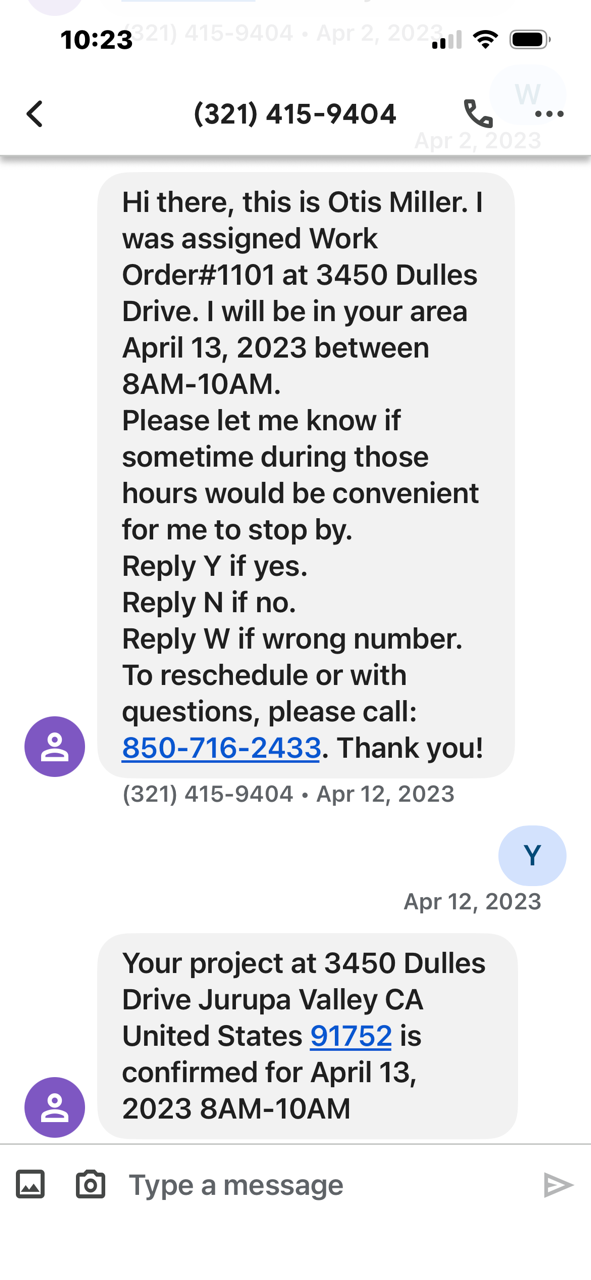
"Scheduling via text is super convenient. I just reply Y or N and it's done. No text threads or missed calls to track."
Tim S — TenantRun your next maintenance job through this.
You'll know by the end of the day if it works. No setup headache. No new system to learn. Takes less than 5 minutes to set up your first job.$15 to try · 30-day money-back guarantee
Get Early AccessNo migration required. Cancel anytime.